Showing posts with label tools. Show all posts

Tuesday, 1 December 2015

OneNote - the first app of Christmas

Embedded image permalink
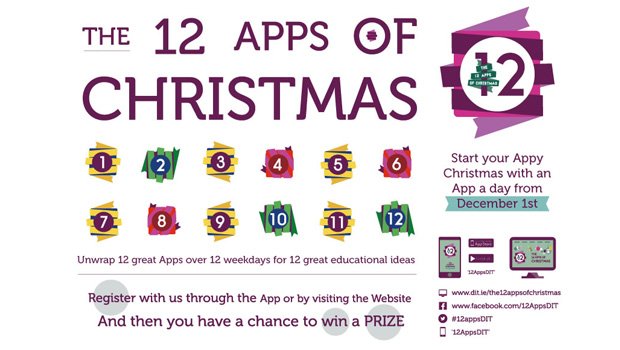
I have posted the picture above so you can see what this blog is going to be all about for the next 12 days. You can join in too!

I'll be blogging (briefly) on each app as a way of a) remembering them all and b) reflecting on how they could be used in my teaching practice.

So, OneNote.
I've actually been using OneNote since 2008; you know, back when things were called 'programs' rather than 'apps'. At that point I didn't use it for any of the collaborative features or any of that jazz. I used it for one reason only - you can write anywhere on the page! You just click and start writing, and if you get bored you click the cursor somewhere else and write something else (this was pretty exciting in 2008, well, to me, erm...I can't make this any better. I liked it, alright!) The other cool thing about it was the autosave. No more forgetting to save your work and losing it when the computer froze. It just saved automatically.

The flexibility of being able to jump around the page so easily I found really useful primarily for writing fiction and poetry. Somehow, this helped free up my creativity and I enjoyed writing on the computer a lot more than I had previously. As I worked on my novel (a yet unpublished document, although sure to be a posthumous masterpiece) I found the ability to create pages really helpful, and I made a page for each chapter. Eventually I had a tab for each new story I wanted to write, and now I have a whole notebook for poetry, one for fiction, one for life stuff (notes, pictures, to do lists etc) and one for non-fiction writing.

The best thing about it now is the cloud element, and the fact you can download it for free. It's so useful to be able to jump on any device and find all my crazy writing just there. Even if the PC I'm on doesn't have it installed I can login online. Perfect.

I can completely see how many learners, frustrated with using traditional word processors but needing to capture their thoughts electronically, would find OneNote much more freeing and useful. And the fact you can share notebooks really opens up collaborative possibilities both for students working in groups and for me thinking about ways to get students to work together and engage more flexibly with a task. As we have it here at UEA as part of Office 365 I shall have to give this some serious thought!

And just for fun, here is a poem I wrote very many years ago now, courtesy of OneNote:

Tide clock

Time passes in the wave of grass, the sweep of rain across the bay, the meticulous chewing of the cows in the field. I watch the shifting clouds, feeling the wind whipping over my skin and blowing holes in my lungs.
The flecks of air flick sand and salt into my face, into my eyes.  I hear the endless waves. For them time is a monotony of breaths drawn in and out, never ceasing, ever.
I breathe in sympathy with the long ravaged sea, and feel myself melt into the earthy wildness, an insignificant second rhythm tapping lightly along with the rest, unheard by most, and short-lived.

Lying here  in outward harmony, I count time, crash by crash.

Sunday, 21 October 2012

Integrating 'things'...

It's funny really...one of the reasons I like doing this blog is that I can reflect a lot on the tools I've already used in my work, but I'll be honest it's rare I have the time or inclination to actually try something new! I expect this is a common theme amongst librarians, the chime of "if only I had time I could do this". So what can I actually take from this blog and convert from an "If only..." into "I've done..."?

This blog has caused me to revisit my Google Drive and the usefulness of Google docs. In a recent teaching session, rather than handing out 80 handouts I decided to try and save trees by uploading the handout to Google docs and giving the link to students instead. I think this worked - at least all of the students were able to easily access the handout and bring it up on their screens. It's something I think I would choose to do again and it also means the handout is then accessible on the web at any time should the students want to come back to it.

I've kept my LinkedIn! Having been pretty disparaging about the interface and begrudgingly creating an account, I've both finished creating my profile and updated it. I can't ignore the fact it's a well used professional resource, and that it helps raise my profile as an information professional and create links with others who I could potentially work or collaborate with in the future. I considered deleting my profile, but realised that fighting against the tide in this manner when I'm perfectly capable of maintaining my profile is probably a futile gesture. Who knows how useful it could be in the future?

My RSS reader on the other hand, while it's full of interesting stuff, hardly ever gets looked at! One of the reasons is that I prefer to browse for my information - so rather than getting information through news feeds or blogs I like going to The Guardian and having a look around. But as I've mentioned before, my primary source of information 'pushed' to me on the web comes from Twitter. I remain addicted - It's a fantastic resource. I do sometimes show my RSS reader to students though, to demonstrate ways in which they can gather information that is sent to them in an efficient way - I'll be honest most students don't look all that thrilled by it. Perhaps they see that no matter whether their news feeds are gathered in one place or not, they'll still make them the lowest priority in their researcher lives.

The last blog post I made was regarding screencasts, although the 'thing' also included considering podcasting, which I basically ignored However, I think creating podcasts could be a very effective way of creating learning resources quickly and easily that can then be disseminated through the web and student blackboard sites. This is something I would like to keep as an idea ticking over, and give it a go as soon as I have time. Hey, we all need an 'if only..." to aspire towards!

Screencasting & learning to love the sound of your own voice

Ah screencasting....if you're anything like me you find recording screencasts a fairly unpleasant experience, where you have to talk out loud to a computer, feeling faintly ridiculous  and the only way to check your work is to then listen to the sounds of your own voice repeating over and over again. Not really my idea of fun!

But they're a great tool. I've created screencasts to demonstrate how to navigate databases and renew loans, and even in place of being able to attend a teaching session. I've used the free online tool Screencast-o-matic, which once uploaded to a Youtube channel you can then add annotations and a transcript, creating a very accessible resource. Here's an example of mine:


While I think screencasts of this kind are really useful resources I do think they have to be carefully planned, and videos of any significant length are never going to be useful to students - anything over three minutes can become very tedious very quickly (as perhaps the above video demonstrates? I'd be interested to know how many of the video viewers actually watched the whole thing). Interestingly, the video I created to demonstrate to students how to use their Microsoft Live Skydrive has received over 3000 hits, 10 times as many as my library screencasts - which probably goes to show the way in which students expect to learn: they expect IT information to come from the internet and is useful in video format. But library information - can students learn it effectively from videos? Will they understand the process and be able to transfer that learning to another searching need or just follow step-by-step? Will they even search for help in the format of videos or will they get sidetracked one they're on Youtube watching much more entertaining videos?

At the moment, my new role as a Faculty Librarian takes me away from the subject librarian role somewhat in that I don't currently have time to create subject-specific resources of the kind I would like to provide for students, including screencasts of using particular databases for specific subjects. While I don't know what kind of impact these videos actually have, I do believe that providing learning tools like these in as many formats as possible is great for meeting the different needs of students, and they're always a fantastic thing to have up your sleeve for those moments where you just can't bear to explain how to do a search one more time!


Friday, 21 September 2012

A few of my favourite things...

Ooooo Thing 17 is about SlideShare and Prezi. Well, if anyone hasn't even tried creating a Prezi, then you should. It's so much fun! You can see my Prezis here: http://prezi.com/user/vnmvaifawcrj/

Interestingly, I've created a few of these because I love the way they create a visual 'path' than can link you from idea to idea, and are far more interesting then PowerPoint presentations. However, I very rarely use them in practice. Mostly they've been embedded in subject pages I've created online, and I've included the links to them in handouts and guides. I am wary of using them to present because of the way Prezi 'swings' between slides, which can definitely make you feel a little bit ill if you overdo it! It's also not always easy to move forward and back through your path, although I do like the ability to go 'home' and see the whole presentation and then select which bit you want to zoom in on (I'd love it if, once you've done this and then click forward it automatically takes you to that part of the path and moves you on from there, but it doesn't do this unfortunately). Also, using Prezi means you're relying on a functioning internet connection where you are delivering your presentation, which can be a gamble, but perhaps I should be braver and give it a proper go. I do so love making Prezis after all...

However, I am not a PowerPoint hater. I think PowerPoint is an extremely useful tool. It's exceptionally easy to knock-up a few ppt slides when you need to, it's a platform for delivering information that is easy to understand and follow, and it is certainly possible to use ppt well. As for SlideShare, I love it. I find it an invaluable tool for keeping up-to-date with professional practice - especially for things like accessing conference presentations which you were unable to attend. It's also a great place for getting inspiration for slides, although as I mentioned in Thing 15 I think watching how someone uses slides in their presentation delivery is probably the most useful way of learning best practice. Here are some of the presentations I've accessed on SlideShare recently:


I haven't started sharing my own material on SlideShare, even though I have an account.Sitting here now I wonder if this is because I feel my slides would be a voice amongst many, adding unnecessarily to the internet noise. Do I not have faith in the material I've created? Does part of me not believe my work is worthy of sharing (and if this is the case why was I happy to present it in the first place?) Also, my slides tend to be very image based, with little words, so do I just assume they wouldn't make sense or be useful to anyone? In fact, I hope that as my experience and confidence grows and I write more material to contribute to the profession, I'll start to feel sharing my work in this way is a natural part of the professional process. For now though, I've just uploaded the presentation on my MSc dissertation I gave to the AULIC group on Thursday 26th July 2012. Enjoy!

Sunday, 9 September 2012

Mendeley and Zotero - let the games begin

A few days ago I sat down to start planning out my teaching sessions and started considering how I would recommend to our students they manage their information - not just by noting down the references of useful sources they find, but practical ways of saving and storing documents in a way that will enable the to find them again. I was reminded of this blog post by Patrick Dunleavy I read last week: 'I was an EndNote refusenik, but now I’m a Mendeley convert' and I decided it was about time I started exploring some online tools.

So, a few weeks ago when I was starting to think atbou Thing 15 I downloaded Zotero Standalone. and then forgot about it. I am not a firefox user, having been converted to Chrome a while back and discovering that using any other browser now seems just very clunky. Nevertheless, I thought I'd give Zotero a go, and see how far I got. Not very far is the answer. Unfortunately while on the university campus I am restricted as to the things I can download, and apparently add-ons into my browser aren't allowed, so I failed in my attempt to download the Zotero Connector. I began to feel the stirrings of frustration. Next I tried to import a document, which didn't work, and directed me to a singularly unhelpful help page. I started to play around with trying to manage pdfs and bibliographies and found myself very confused. At this point I gave up. Sorry Zotero.

I decided to turn to Mendeley and play with a different tool. Downloading Mendeley desktop was straightforward (as was downloading Zotero Standalone, to be fair). But the Mendeley interface seemed more intuitive, and the help far more abundant. It took me no time at all to find the 'watch folders' function, and suddenly all of the pdfs I'd named in a cryptic an inconsistent manner over the last 3 years, and then carefully stored in a selection of random folders, magically appeared in Mendeley - the majority of which with the correct metadata and all with the pdf attached. I was impressed. I then signed-in to Web Mendeley and the sync function meant the records for all my documents were there instantaneously  Impressed again.

It was about now I wanted to download the Web importer for my browser - but I knew I'd run into the same problems downloading it as I had before, so I went home to try this. Having felt a little guilty about being unfair to Zotero, I also downloaded the Zotero Connector to compare. I think the Zotero Connector works better - it'll pick up all of the records on a webpage and import them into Zotero Standalone very quickly. Mendeley Web Importer was more tricky, as you have to allow pop-ups for every separate site, and make sure you're logged in to Web Mendeley, You then get a list of all the records on a page, and select each one for downloading individually (although this was useful - a quick way of sifting through my results and only saving the records for the results I thought were most useful). As far as I can see I'd still need to download and save my pdfs though if I wanted them stored in Mendeley Desktop as well, so perhaps saving the pdf directly to my watched folder would be a better way of importing the information...and side-step pop-blocker issues with the Mendleey Web Importer.

By this time, as you can probably tell, I was sold on Mendeley. Installed at work and at home, with my documents quickly synced across both, and the watched folder option - yep, it's all working for me. The final thing to do was install the MS Word add-on to use Mendeley to create my citations and references in an actual document. This installs straight into the References ribbon in Word, and is straightforward to use. In fact, under the Add-ins tab, the Zotero reference management tools had appeared as well so I had a play with these. I'm not sure there's much to choose between them really. just as, if you have access to Endnote or Refworks, you'd be using those as well in much the same way. And I've never really used this sort of tool in my own work, as I find tinkering with the style to make sure it meets my needs time-consuming and frustrating. So I gave up at this point - these are my own prejudices effecting my judgement.

I suspect, for anyone needing to use a bibliographic reference tool, using either Zotero or Mendeley would be extremely helpful, and possibly more user-friendly than Endnote. Mendeley gets my vote though, just for how incredibly easy (and satisfying) it is to use. And I haven't even started exploring the collaborative/file-sharing functionality that's made Mendeley so successful...

Sunday, 24 June 2012

Organising things!

Google Calendar

I've had a Google Calendar for a while now, when I decided that buying paper diaries was too expensive and it was about time I went paperless. I have it synced with my iPhone, so I always add/edit from there as I'm usually consulting it when I'm out and about. I never login from an actual computer! Thinking about this now it seems a bit strange, as I'm constantly logged into Google on my home computer...odd huh?! I just opened the calendar for fun today and realised how much I've actually come to rely on it since chucking my paper diary. I also noticed that my group of graduate library trainees used a Google calendar to arrange our events, something I'd completely forgotten - I suspect Google calendar of being one of those really useful tools you forget about until you need it, and then it turns out to be pretty perfect.

Evernote

Ok. This is one thing I've been really excited about since I started cpd23 as I'd never heard of it and it sounds like exactly the sort of thing I'd like very much, so I dived straight in. While it's obviously a great tool for organising your notes, photos etc. by theme or by project, I can't imagine I'd need to use it for this function particularly - as I have a dropbox for storing my documents for accessing from wherever I am and for sharing with others.
I downloaded the web clipper straight away and played with that function instead, because I think it's genius. Being able to highlight and clip text, save pages, pictures, articles...it's brilliant! I often end up emailing links to myself which get lost in amongst all my other emails, whereas this provides a much more visual and handy way of storing the web tit-bits I come across. I also downloaded the app to my iPhone so I can create notes and access them from there too. Click here to link to a note I prepared earlier.
This is a tool I'm going to be using a lot more I imagine. Can't wait to get to work and download the web clipper there. Fun!